
Pages
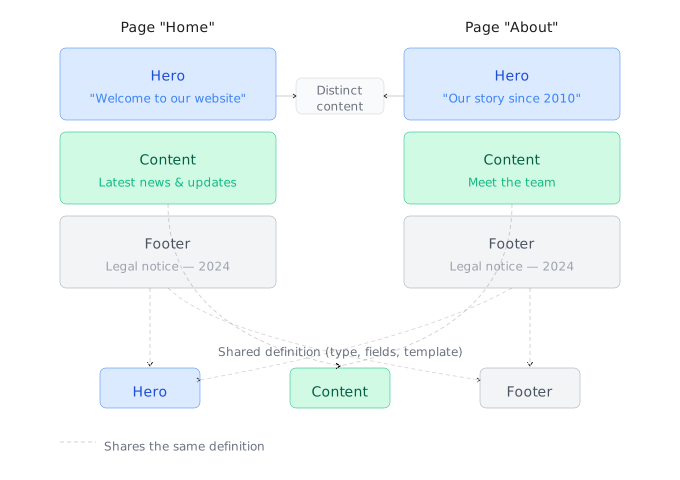
A Creopse page is a stack of section instances: each section appears there with its own data, a display order, and an active/inactive state. The section itself (component + structure) is defined once — see Sections & Widgets — and can be instantiated on several pages, or several times on the same page, with distinct content each time.
See the CLI reference for the complete syntax of the commands used below, and Pages for the admin panel equivalent.
Creating a page
creopse page add home --title "en:Home" --title "fr:Accueil" --position 1This command only creates the page shell (title per language, optional content, position) — no section is attached at this stage.
Detail pages (*-details)
A detail page (service-details, project-details, news-details...) is a page like any other, created the same way, usually carrying a single detail-type section (ServiceDetails, ProjectDetails...). Two differences set it apart from a regular page:
- It does not get a menu entry — its entry point is a permalink rather than a direct navigation link.
- The content it displays doesn't come from its own section structure, but from the content model item resolved by the permalink (
useProps().contentModelItem).
Attaching sections
creopse page attach-section home Hero --link-id top --data @.creopse/sections/Hero/fake-data.json
creopse page attach-section home Hero --link-id bottom --data '{"heading":"Footer hero"}'
--link-id identifies a specific instance (default if omitted). Use an explicit id as soon as the same section needs to appear more than once across the site — on the same page (example above) or on different pages — each with its own content.
Sharing data across pages
For a section meant to stay strictly identical everywhere (Footer, Header typically) rather than manually duplicated on every page:
creopse page attach-section about Footer --link-id bottom
creopse page set-section-source about Footer --link-id bottom --source-page home --source-link-id bottom
A future change to the Footer on home then automatically propagates to about.
Ordering sections
creopse page order-sections home --item "Hero:top" --item "Hero:bottom"The order of --item entries (section:link-id format) determines the vertical display order on the page.
Enabling, disabling, or detaching an instance
creopse page toggle-section-status home Hero --link-id bottom --disabled true
creopse page detach-section home Hero --link-id top --force
toggle-section-status disables an instance without removing it (useful for a section that's ready but not yet meant to be published); detach-section removes it permanently — reserve this for attachment mistakes rather than temporary disabling.
TIP
All of these commands can also be triggered from the admin panel — see Pages for the visual equivalent of each action.