
Content Models
A content model (content-model) defines a field structure; its items are the actual records that conform to it. This is the mechanism to use whenever content follows a "list + detail" pattern rather than a single piece of content carried by a section — Services, Projects, Team members, training offers, and so on.
When to use a content model
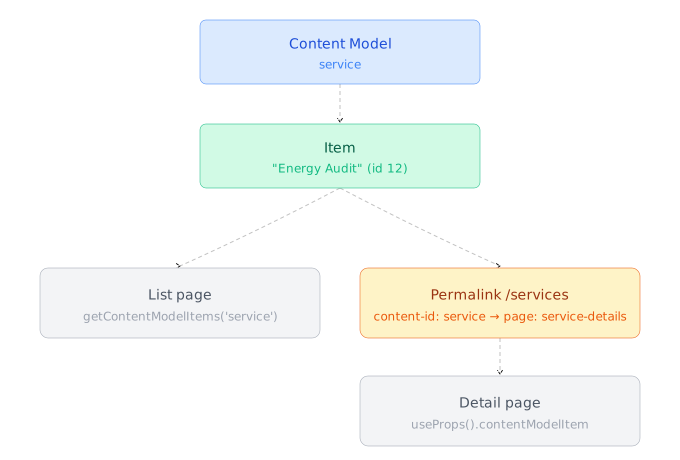
A content model is needed as soon as a component needs to display a list of identical elements, each with its own detail page (Services.vue + ServiceDetails.vue, Projects.vue + ProjectDetails.vue...). That's the distinguishing sign compared to a plain section collection: a component consuming content model items relies on getContentModelItems/getPaginatedContentModelItems (see Consuming a content model below) and getContentPath(item) (see Utilities) rather than getSectionData/getSectionRootData alone.
intent and access-scope
Every content model is created with an intent/access-scope pair that determines who produces the data:
| Content type | intent | access-scope | Examples |
|---|---|---|---|
| Content managed only from the admin panel (editorial, catalog) | editorial-content | internal | Services, Projects, Team, Articles, training offers |
| Content submitted by site visitors | user-data | user-editable | Contact form messages, sign-ups |
The distinction is about who originally produces the data (the editorial team vs. the site visitor), not who can consume it afterward — a services catalog stays editorial-content/internal even if an administrator can edit it from the admin panel.
Creating a content model
See the CLI reference for the complete syntax.
creopse content-model add service editorial-content internal \
  --title "en:Service" --title "fr:Service" \
  --data-structure @.creopse/content-models/Service/data-structure.json \
  --title-field-name name \
--has-permalink true--title-field-name: the structure field used as the display title in the admin panel (usuallynameortitle).--has-permalink:trueas soon as the model has a dedicated detail page. This flag alone wires nothing — it only marks the model as eligible. The actual route (URL prefix + target page) is wired separately withcreopse permalink add, see Permalinks.
Data structure
A content model's structure only follows the "singletons" part of the format used by sections: an array of fields, with no nested index key (a content model generally has no collections, only flat fields).
[
  { "key": "name", "type": "i18n-text", "label": "{\"en\":\"Name\",\"fr\":\"Nom\"}", "options": [], "required": true, "settings": {} },
  { "key": "content", "type": "i18n-editor", "label": "{\"en\":\"Content\",\"fr\":\"Contenu\"}", "options": [], "required": false, "settings": {} },
  { "key": "image", "type": "image", "label": "{\"en\":\"Image\",\"fr\":\"Image\"}", "options": [], "required": true, "settings": {} },
  { "key": "parentService", "type": "content-model-item", "label": "{\"en\":\"Parent service\",\"fr\":\"Service parent\"}", "options": [], "required": false, "settings": {} }
]
The same field types and choice rules that apply to sections apply here (i18n-editor for any description, text for proper names and URLs, etc.).
Adding items
creopse content-model item-add service --title "en:Energy Audit" --data @.creopse/content-models/Service/items/energy-audit.json
creopse content-model item-edit 12 --title "en:Renamed"
The --data file follows the same index nesting as a section's fake data (an {"index": {...}} object), even though the structure itself is flat:
{
  "index": {
    "name": "{\"en\":\"Energy Audit\",\"fr\":\"Audit énergétique\"}",
    "content": "{\"en\":\"<p>...</p>\",\"fr\":\"<p>...</p>\"}",
    "image": "content/energy-audit.jpg"
  }
}
This nesting is reflected directly on the detail component side, which accesses fields through contentModelItem?.contentModelData?.index?.name — omitting it when writing an item's fake data produces an empty detail render.
Consuming a content model
List
const { getContentModelItems, getPaginatedContentModelItems } = useContent()

// All active items
const services = await getContentModelItems('service')

// Server-side pagination, with filters
const { items, total, currentPage } = await getPaginatedContentModelItems(
  'service',
  1,
  9,
  true,
)
Use getContentModelItems for a small volume loaded at once, getPaginatedContentModelItems as soon as server-side pagination or filtering is needed.
Items also carry a position field, set from the admin panel's drag-and-drop Reorder items action. Pass sortBy: 'position' (both functions accept sortBy/sortDirection) to fetch items in that order instead of the default (created_at desc):
const services = await getContentModelItems('service', true, 'position', 'asc')Detail
On a detail page (ServiceDetails.vue/ServiceDetails.tsx), the current item is exposed through useProps():
<script setup lang="ts">
const { contentModelItem } = useProps()
const item = contentModelItem?.contentModelData
</script>

<template>
  <h1>{{ tr(item?.index?.name) }}</h1>
  <div v-html="rHtml(item?.index?.content)"></div>
</template>const { contentModelItem } = useProps()
const item = contentModelItem?.contentModelData
return (
<>
<h1>{tr(item?.index?.name)}</h1>
<div dangerouslySetInnerHTML={{ __html: rHtml(item?.index?.content) }} />
</>
)Shared store for a model reused across sections (Vue)
When the same content model (with few items) is consumed by several sections — typically a list/detail pair like Services or Projects — loading the items once into a Pinia store at startup avoids redundant calls to getContentModelItems:
// resources/js/stores/content.ts
import type { ContentModelItemModel } from '@creopse/utils'

interface ContentState {
  services: ContentModelItemModel['data'][]
}

export const useContentStore = defineStore('content', {
  state: (): ContentState => ({ services: [] }),
})// resources/js/composables/dataloader.ts
export const useDataloader = () => {
const { services } = storeToRefs(useContentStore())
const { getContentModelItems } = useContent()
const initializeData = async () => {
services.value = (await getContentModelItems('service')) || []
}
return { initializeData }
}<!-- resources/js/App.vue -->
<script setup lang="ts">
const { initializeData } = useDataloader()
initializeData()
</script>This pattern is optional and only makes sense for a low-volume model consumed by several sections. For a model consumed by a single section, call getContentModelItems directly inside the component. For a high-volume model requiring filtering/pagination, prefer getPaginatedContentModelItems on demand rather than this store (which loads everything into memory).
WARNING
This pattern relies on Pinia, specific to the Vue stack — there is no standardized equivalent on the React side of the current Creopse ecosystem. On a React project, a shared state mechanism (Context, Zustand...) needs to be set up on a case-by-case basis.
Permalinks
--has-permalink true alone is not enough to make a detail page reachable: see Permalinks to actually wire the model's URL prefix to its detail page.